AI update for your website
When was the last time you really invested in your website? Not just a new banner, no color adjustments — but structurally. For many companies, the honest answer is: too long ago. That wasn’t a big problem in the past. It is now.
AI is changing how people search for information, compare products, and make decisions. If you don’t adapt your website, you not only lose rankings. You lose the conversation with the customer before it even starts.
Why outdated websites cost visitors — with numbers
Just two years ago, a well-maintained website with decent SEO was sufficient. That time is over.
Gartner forecasts that the volume of classic search queries will decline by 25% by the end of 2026 (Gartner, 2024). This is not a gradual change — this is a cut. Nearly three in five consumers are already replacing classic search engines with Generative AI (Capgemini, 2025). And 39% of consumers use AI for product searches; among Gen Z, it's already over 50% (Salesforce Connected Shoppers Report, 2025).
What does this mean concretely? Today, those seeking information ask ChatGPT, Perplexity, or the AI Overview on Google. These systems pull their answers from content that is clearly structured, precisely formulated, and thematically relevant. A website with outdated texts, vague statements, and poor information architecture simply does not appear in these answers.
That is the new competition: not just for rank 1 on Google, but for whether AI systems even recognize your content as a reliable source.
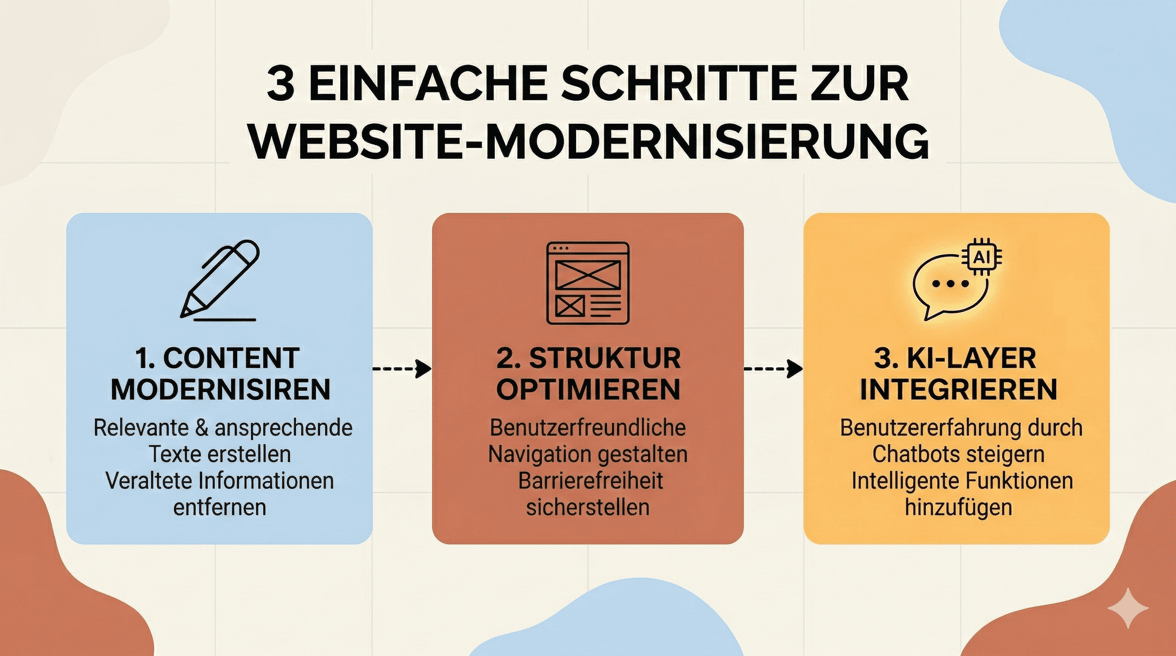
Three steps can help close this gap.
Step 1: Content refresh with AI
Good content ages poorly. Product descriptions from 2021, blog articles without data, landing pages with generic promises — all this signals to both AI systems and users: there is nothing current to find here.
A content refresh does not mean rewriting everything. It’s about setting priorities.
What first? Pages with the highest traffic potential and the greatest degree of content obsolescence. These are often category pages, FAQ sections, and the central product pages.
When revising, a few simple questions are worth considering: Does this text answer the question a user actually asks — or the question you hoped they would ask? Are there concrete numbers, examples, or use cases? Is it clear who this content is intended for?
AI tools can assist in the revision process: analyzing texts, highlighting gaps, generating variants. But the decision about what is relevant remains with the team. AI accelerates the process. It does not replace judgment.
A practical start: take the ten pages with the worst engagement (high bounce rate, short dwell time) and rewrite each with a clear focus on a user question. That alone makes a noticeable difference.
Step 2: Intelligent structure and UX
Content alone is not enough. How content is organized on your website determines whether users find what they are looking for — and whether AI systems understand what it is about.
Structural problems often manifest subtly: navigation with too many levels, internal links that lead to dead ends, pages that overlap thematically. Difficult for humans, unreadable for crawlers.
A few points worth checking:
Clear page architecture. Each URL should belong to a clearly defined topic. No overlaps, no duplications. This not only helps with crawling — it makes navigation more intuitive for real users.
Logical internal linking. Pages should support each other. A blog article refers to the corresponding product page. The product page links to relevant use cases. This creates thematic depth that AI systems can interpret well.
Structured data. Schema markup is not rocket science, but it is often underestimated. FAQ schema, Product schema, Article schema — these tags help search engines and AI systems correctly classify the context of your content.
Fast loading times and mobile optimization. This sounds like 2018, but it remains a real ranking factor and determines abandonment rates. Many corporate websites still have significant potential for improvement, especially on mobile devices.
UX and SEO are not separate disciplines here. A page that quickly leads users to the right answer will also be rated better by AI systems.
Step 3: Interactive AI layer
The first two steps improve what is already there. This step adds something new.
81% of customers try to solve problems themselves before contacting support (Harvard Business Review). 67% prefer self-service over talking to an employee (Zendesk). And the use of AI chatbots by shoppers has increased by 32% year-on-year (Salesforce Cyber Week 2024).
These are not niche phenomena. This describes how the majority of your visitors work today. They come with a specific question — and if your website does not answer it directly, they leave.
An interactive AI layer closes this gap. Not a general bot that presents three menus and then redirects to an email address. But a system that responds based on your own content: your products, your use cases, your language.
The difference between a generic chatbot and a context-based AI assistant is significant. The former generates frustration. The latter answers questions that users actually ask — including those that are not explicitly answered anywhere on the website.
Solutions like branchly help bring exactly this layer to existing websites without cumbersome development projects. The content is already there. It’s about making it accessible.
Checklist: 5 signs that your website needs an AI update
You now know what to do. But how urgent is it for you? Here are five indicators that signal the need for action:
1. Your organic search queries are stagnating or declining.
If traffic sources are stagnating despite regular publishing, a structural look is worthwhile. It is often due to thematic blurriness or outdated content.
2. Visitors cannot find what they are looking for.
High bounce rates on category and product pages are a clear signal. Users arrive, do not see the answer to their question immediately, and leave.
3. Your support team repeatedly answers the same questions.
Recurring questions in support are unused content potentials. If the website does not answer these questions, the solution is clear.
4. Your content is older than 18 months and has not been updated.
Outdated data, obsolete formulations, missing up-to-date examples. AI systems prefer fresh, clearly evidenced content.
5. You do not have a structured self-service channel on the website.
No FAQ, no configurator, no interactive assistant. Those who do not offer self-service miss the expectations of a large part of their visitors.
If two or more of these points apply: Now is the right time for an update.
The change in search behavior is no longer a future hypothesis — it is happening now. Those who act now gain a lead that is hard to catch up on. Those who wait lose not only traffic. They lose relevance.